Videotape 2: Betamax, 8 mm video, MiniDV, PAL, and tape repair
Every other video format clients bring, the digital FireWire transfer, foreign standards, and how to open, clean, splice and re-shell a damaged cassette.
🧰 What you'll need
Every tool and supply named in this unit. Dotted-underlined words in the text jump back here. Buttons open that store's search for the exact product. Prices are rough ranges in Canadian dollars.
Nitrile gloves, powder-free under $25
What it is: Thin disposable rubber-like gloves. They keep skin oil off film and glossy photos and still let you grip.
Our pick: Any powder-free nitrile exam gloves, in your size (S, M, L). Not latex, not vinyl.
In a store: Pharmacy, Costco, hardware store
N95 mask under $25
What it is: A fitted filter mask that stops mold spores and soot. A cloth or surgical mask does not.
Our pick: 3M 8210 N95 respirator
In a store: Hardware store, safety supply
Steel ruler (mm) under $25
What it is: A ruler marked in millimetres, for measuring cassettes and film to identify them.
Our pick: Any 30 cm steel ruler
In a store: Dollar store, hardware store
PEC pads (lint-free wipes) under $25
What it is: Very soft wipes that shed no fibres. Used with PEC-12 on film, and with film cleaner on movie film.
Our pick: PEC*PAD lint-free wipes, 4x4 inch, pack of 100
In a store: Camera store
Needle-nose pliers under $25
What it is: Pliers with long thin jaws, for pulling small nails, brads and staples straight out of a frame.
Our pick: Any 6 inch needle-nose pliers
In a store: Hardware store
Small zip bags under $25
What it is: Clear resealable bags for screws, brads, cut film pieces and old parts. Job number written on the bag.
Our pick: Zip bags in snack and sandwich sizes
In a store: Grocery store
S-VHS VCR $100 to $500
What it is: A video cassette player. S-VHS models with a built-in TBC give the cleanest picture. We also keep a cheap one for risky tapes and one only for cleaning.
Our pick: Used JVC HR-S7000 to HR-S9000 series, or Panasonic AG-1980. A second, ordinary VHS VCR for rough use.
In a store: Second-hand: eBay, Marketplace, thrift stores
S-Video and RCA cables under $25
What it is: S-Video is a round plug with 4 pins that carries picture. RCA plugs are the red and white (sound) and yellow (picture) plugs.
Our pick: 6 ft S-Video cable and a red/white/yellow RCA cable
In a store: Electronics store
Video capture device $25 to $100
What it is: A small box or stick that turns the analog video signal into a digital one for the computer over USB.
Our pick: I-O Data GV-USB2 (import), or Elgato Video Capture
In a store: Amazon
99% isopropyl alcohol under $25
What it is: Pure rubbing alcohol that evaporates with no residue. Cleans metal heads and tape paths. Never on shellac records. Never on photos.
Our pick: MG Chemicals 824 (99.9%), or pharmacy 99% isopropyl. Not the 70% kind.
In a store: Pharmacy, electronics supply
Video splicing tape and splicing block $25 to $100
What it is: Thin, strong tape made for joining magnetic tape, and a metal block with a groove that holds the two ends in line. Widths: 1/2 inch for VHS, 1/4 inch for reel and 8-track, 1/8 inch for cassette.
Our pick: Splicit splicing tape and splicing blocks, in the width you need
In a store: Audio tape suppliers
Donor shells under $25
What it is: An empty cassette shell taken from a tape nobody needs. A client's tape reels are moved into it when their own shell is broken.
Our pick: Screwed-together VHS tapes and 5-screw audio cassettes
In a store: Thrift stores
FireWire cable under $25
What it is: The cable that copies digital video from MiniDV and Digital8 camcorders. Small 4-pin plug at the camcorder end.
Our pick: 4-pin to 9-pin FireWire 800 cable for the 2009 iMac (4-pin to 6-pin for PC cards)
In a store: Amazon
Digital8 or MiniDV camcorder $100 to $500
What it is: The camcorder is the tape player. A Digital8 model with analog playback also plays Video8 and Hi8 tapes.
Our pick: Used Sony DCR-TRV series Digital8 with "plays Hi8/8mm"; any working MiniDV camcorder with DV out
In a store: Second-hand only
Food dehydrator and thermometer $25 to $100
What it is: A low-temperature drying box. Supervisors use one, with a separate thermometer, to bake sticky-shed tape.
Our pick: Round stackable dehydrator with an adjustable thermostat (Nesco or Presto), plus a digital probe thermometer
In a store: Canadian Tire, Walmart
Same chain, different deck
Betamax, Video8, Hi8, U-matic and LaserDisc are analog. They use the exact chain from Unit 11: player, S-Video if available, stabilizer, capture device, computer. Only the player changes.
| Format | Player | Best output | Notes |
|---|---|---|---|
| Betamax | Betamax VCR | Composite on most. SuperBeta and ED Beta decks add S-Video. | Three speeds (Beta I, II, III). Later decks cannot play Beta I. L-750 = 3 hours at Beta II. |
| Video8 | Video8, Hi8 or Digital8 camcorder or deck | S-Video on Hi8 machines | Mono or stereo FM sound. Some have extra PCM digital audio: check the deck's audio switch. |
| Hi8 | Hi8 or Digital8 machine | S-Video | Dropouts (white streaks) are common: the tape is thin |
| Digital8 | Digital8 camcorder | FireWire (DV) | Digital. See the DV section. |
| MiniDV / DVCAM | MiniDV camcorder or deck | FireWire (DV) | Digital. LP-speed tapes play best in the camcorder that made them. |
| HDV | HDV camcorder | FireWire, HDV mode | High definition MPEG-2 stream |
| U-matic, Betacam | Matching pro deck | Composite, component or S-Video | Supervisor. Sticky-shed is common. |
| LaserDisc | LaserDisc player | Composite. S-Video depends on the player. | Analog video on a disc. Check for "laser rot" speckles. |
DV tapes: copy, do not capture
MiniDV, DVCAM and Digital8 tapes hold digital files. FireWire copies the exact data. Using the yellow analog plug throws quality away.
- 1Camcorder in Play / VTR mode, on mains power, tape in
- 2FireWire cable: small 4-pin plug to the camcorder, other end to the computer
Connect with both devices switched off, then power on. Hot-plugging FireWire can burn out the port.
- 3Open the DV capture software
Windows: WinDV or Scenalyzer Live. Older Mac: iMovie or QuickTime Player (File, New Movie Recording, choose the camcorder). Linux: dvgrab.
- 4Settings: DV, type 2 AVI or .dv/.mov, "split by scene/timestamp" on if offered
- 5Rewind, press capture.
The software controls the camcorder.
- 6Real time: a 60 minute tape takes 60 minutes
- 7Check the file. About 13 GB per hour is correct.
- Connection
- FireWire / i.LINK / IEEE 1394
- Format
- DV, 720 x 480, unchanged
- Size
- About 13 GB per hour
- Audio
- Check 12-bit vs 16-bit; capture as recorded
- Date and time
- Stored in the DV stream; keep it
| If you see or hear | Likely cause | Do this |
|---|---|---|
| Blocks, frozen squares, audio stutter | Dirty heads, or LP tape in a different machine | Try the original camcorder. One 10 second pass of a dry head-cleaning tape, supervisor present. |
| Software does not see the camcorder | Wrong mode, cable or port | Play/VTR mode. Reseat the cable with power off. Try another port. |
| Capture stops at every scene | Timecode breaks | Turn off "stop on timecode break", or capture in sections |
| Tape recorded in HDV shows nothing in DV software | Wrong mode | Set the camcorder's i.LINK output to HDV and use HDV-capable software |
PAL, SECAM and NTSC
| Standard | Lines and rate | Where |
|---|---|---|
| NTSC | 480 lines, 29.97 fps | Canada, USA, Mexico, Japan, Korea, Philippines, parts of South America |
| PAL | 576 lines, 25 fps | UK, most of Europe, Australia, NZ, India, China, much of Africa and South America |
| SECAM | 576 lines, 25 fps, different colour system | France, Russia and former USSR, parts of Africa and the Middle East |
- A PAL tape in an NTSC VCR: rolling picture, black and white, wrong speed, or nothing.
- It needs a PAL or multi-system VCR and a capture device set to PAL (720 x 576, 25 fps).
- Capture PAL as PAL. Do not convert the master to NTSC. The access MP4 plays anywhere as 25 fps.
- SECAM tapes played on a PAL deck show in black and white. They need a SECAM-capable deck.
Opening a cassette
Practise on scrap tapes until a trainer signs you off. Work on a clean tray so screws and springs cannot roll away.
- 1Photograph the cassette
- 2Turn it label side down
VHS has 5 screws. A sticker may hide the middle one.
- 3Remove the screws. Keep the cassette flat.
- 4Turn it label side up, holding the halves together. Lift the top half straight up.
The door comes with the top or stays on the front: note its spring.
- 5Photograph the inside before touching anything
Tape path around the guide rollers, the two reels, the brake levers, the leaf spring in the lid.
- 6Lift reels out together, keeping the tape loop between them
Splicing a broken videotape
- 1Find both ends. Gloves on: finger oil on videotape clogs heads.
- 2Cut away crinkled or stretched tape
Scissors, straight across. Damaged tape can rip a video head. Save removed tape in the job bag.
- 3Lay both ends on a clean splicing block or a ruler, shiny back side up, ends touching
No gap. No overlap.
- 4Apply proper video splicing tape across the join on the back side only
- 5Trim any tape that hangs over the edges
The splice must be exactly tape width.
- 6Burnish. Wind the splice onto the reel by hand.
- 7Reassemble. Capture the tape in the rough-use deck first.
✔ Do
- Break at the very start or end? Reattach the tape to the reel hub with its clip instead of splicing. You lose nothing.
✘ Do not
- Use Scotch tape, masking tape or electrical tape. The glue creeps out and coats the heads.
Shell swap
Cracked shell, broken door, jammed brake, missing roller: move the reels into a good donor shell.
- 1Open the donor (a scrap tape of the same format). Remove and discard its reels.
- 2Open the client's cassette. Photograph the path.
- 3Lift both client reels together with the tape between them and seat them in the donor base
- 4Route the tape exactly as in your photo
Outside the guide rollers and posts, across the front, behind the door.
- 5Check brakes and springs sit correctly. Close, screw, test the door.
- 6Move the client's label, or write the job number and "re-shelled" on the new shell
Mold on tape
| Level | Looks like | Method |
|---|---|---|
| Light | A few white specks on the tape edges | Open the shell. Wipe reel flanges and the visible tape pack edges with a dry lint-free cloth. Run the tape end to end in the dedicated cleaning VCR with lint-free pads held lightly against the tape. |
| Medium | White or grey web across the tape pack | As above, with several passes, changing pads when they discolour. Then clean that VCR's path. |
| Heavy | Thick growth, tape layers stuck together | Supervisor decides. May need a tape-cleaning machine or a specialist. |
- 1Cleaning pass
In the cleaning VCR, fast forward and rewind with pads on both sides of the tape, away from the head drum.
- 2Vacuum and wipe the shell inside, or re-shell into a clean donor.
- 3Clean the cleaning VCR
- 4First play in the rough-use deck. If the picture stays clear for 5 minutes, move to the capture deck.
- 5Clean the capture deck's heads after any formerly moldy tape
Sticky tape and baking
- Sticky-shed: the binder absorbed moisture. The tape squeals, sticks, sheds brown gum on the heads. Common on U-matic, Betacam, some 8 mm video and many reel-to-reel audio tapes. Rare on VHS.
- Baking dries the binder for a few weeks: a food dehydrator at about 50 to 55°C for several hours. It is a supervisor-only procedure with a tested dehydrator and a thermometer.
 ▶Fixing a snapped VHS tape with a splice👀 Watch for: cutting out the damaged part and the butt joinOpens on YouTube in a new tab
 ▶Repairing a broken VHS tape👀 Watch for: holding the ends while tapingOpens on YouTube in a new tab
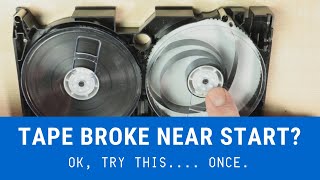 ▶Break near the start or end: the quick fix👀 Watch for: reattaching at the hubOpens on YouTube in a new tab
 ▶VHS shell swap👀 Watch for: moving both reels togetherOpens on YouTube in a new tab
 ▶Take apart, clean, splice, reassemble👀 Watch for: the tape path inside the shellOpens on YouTube in a new tab
 ▶VHS-C tape broken off the spool👀 Watch for: the small parts in a VHS-C shellOpens on YouTube in a new tab
 ▶Repairing an 8 mm video tape👀 Watch for: fishing the tape end outOpens on YouTube in a new tab
 ▶Cleaning moldy videotape👀 Watch for: pads on the tape in a cleaning deckOpens on YouTube in a new tab
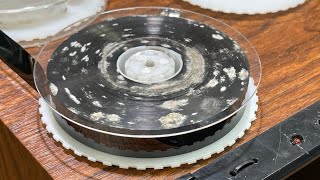 ▶3 ways to clean mold on tapes👀 Watch for: the three set-ups comparedOpens on YouTube in a new tab
 ▶Cleaning a moldy VHS tape👀 Watch for: the mold on the pack before and afterOpens on YouTube in a new tab
 ▶Digitizing MiniDV by FireWire👀 Watch for: the software controlling the camcorderOpens on YouTube in a new tab
 ▶Hi8, Digital8 and MiniDV over FireWire👀 Watch for: the Digital8 camcorder playing analog tapesOpens on YouTube in a new tab
 ▶MiniDV to an older MacBook with FireWire👀 Watch for: cable and adapter typesOpens on YouTube in a new tab
 ▶Baking a U-matic tape with sticky shed👀 Watch for: the dehydrator set-upOpens on YouTube in a new tab
 ▶Baking Hi8 tapes in a food dehydrator👀 Watch for: temperature controlOpens on YouTube in a new tab
📝 Worksheet 12: Videotape 2: Betamax, 8 mm video, MiniDV, PAL, and tape repair
Part A: Quick check
Click one answer. Green means correct. Red means try again. You can try as many times as you need.
1. What is the correct way to transfer a MiniDV tape?
✅ DV is already digital. FireWire copies it bit for bit.
2. A tape plays in black and white with a rolling picture. The client is from Germany. Most likely:
✅ PAL needs a PAL-capable deck and capture set to 720 x 576 at 25 fps.
3. Which tape do you use for a splice?
✅ Household tape glue creeps and coats the heads.
4. Where does a freshly spliced tape get captured first?
✅ A splice can damage spinning heads. We do not risk the best deck.
5. The shell is cracked but the tape is fine. What do we do?
✅ A shell swap keeps the tape path correct and safe.
6. When connecting FireWire you should:
✅ Hot-plugging FireWire can destroy the port.
7. Moldy tapes are cleaned:
✅ Mold spores spread to machines and other tapes.
8. Who decides to bake a tape?
✅ The wrong tape type or temperature destroys the recording.
Part B: Hands-on practice
Do each task with real equipment and practice media. Tick it when you have done it. Your trainer signs when they have watched you do it.
| I did it | Task | Trainer initials |
|---|---|---|
| Identify Betamax, Video8, Hi8, Digital8 and MiniDV tapes and name the player for each. | ||
| Transfer a MiniDV practice tape by FireWire and confirm the file size is about 13 GB per hour. | ||
| Open and reassemble a scrap VHS cassette with the tape path correct. | ||
| Make a butt splice on scrap videotape that passes inspection. | ||
| Reattach a tape end to a reel hub clip. | ||
| Do a complete shell swap on scrap tapes. | ||
| Set up for mold cleaning correctly, with PPE, and clean a practice tape. | ||
| Open a scrap Video8 or MiniDV shell and describe how it differs from VHS. |
Part C: Write or draw your answer
1. Why is FireWire better than the yellow cable for a MiniDV tape?
2. List the steps of a shell swap in order.